2022.06.06.-2022.06.08.
사람 얼굴 이미지 파일 15개, 컴퓨터 이미지 파일 15개를 제공하여 EfficientNet B0 모델로 학습하고,
예측용으로 제공되는 10장의(사람 5장 + 컴퓨터 5장) 이미지 데이터 중 컴퓨터인 것만 인쇄하는 프로그램이다.
- 학습 이미지 : 사람 이미지 15장, 컴퓨터 이미지 15장
- 예측 이미지 : 사람 이미지 5장, 컴퓨터 이미지 5장
- 모델 : EfficientNet B0
학습과 예측 이미지인 총 20장의 이미지는 Github에 미리 올려놓고 수행
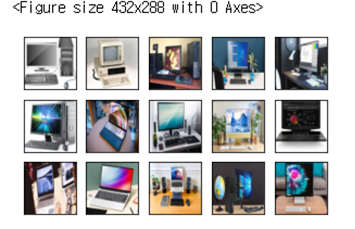
컴퓨터 이미지 15장을 읽어 들인다. 그 후 plot_images 함수를 통해 시각적으로 이미지를 보여준다.
import matplotlib.pyplot as plt
import numpy as np

from skimage.io import imread             # 이미지를 읽어 들인다
from skimage.transform import resize

url =  깃허브 주소


computer_images = []

for i in range(15):
    file = url + 'img{0:02d}.jpg'.format(i+1)
    img = imread(file)
    img = resize(img, (224,224))
    computer_images.append(img)

def plot_images(nRow, nCol, img):
    fig = plt.figure()
    fig, ax = plt.subplots(nRow, nCol, figsize = (nCol,nRow))
    for i in range(nRow):
        for j in range(nCol):
            if nRow <= 1: axis = ax[j]
            else:         axis = ax[i, j]
            axis.get_xaxis().set_visible(False)
            axis.get_yaxis().set_visible(False)
            axis.imshow(img[i*nCol+j])

plot_images(3,5, computer_images)
사람 이미지를 깃허브로부터 읽고 human_images 배열에 저장한다.
마찬가지로 plot_images 함수를 통하여 이미지를 출력한다
url = url 주소

human_images = []

for i in range(15):
    file = url + 'img{0:02d}.jpg'.format(i+1)
    img = imread(file,plugin='matplotlib')
    img = resize(img, (224,224))
    human_images.append(img)

plot_images(3,5, human_images)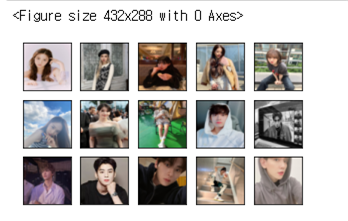
computer 데이터셋의 배열과 human 데이터셋의 배열을 취합하여 X로 지정한다.
y는 여러 X들로 인해 정해지는 값이다.
X = computer_images+ human_images
y = [ [1,0] ]* len(computer_images) + [ [0,1] ] * len(human_images)
X = np.array(X)
y = np.array(y)
print(X.shape, y.shape)
사전 훈련된 EfficientNet-B0 모델을 사용하는 코드이다.
해당 모델은 총 4049571개의 훈련 가능한 매개변수가 있다.
from sklearn.model_selection import StratifiedShuffleSplit
import cv2
from skimage.transform import resize
import numpy as np
import pandas as pd
import matplotlib.pyplot as plt
%matplotlib inline
from pylab import rcParams
from sklearn.metrics import accuracy_score, confusion_matrix, classification_report
from keras.callbacks import Callback, EarlyStopping, ReduceLROnPlateau
import tensorflow as tf
import keras
from keras.models import Sequential, load_model
from keras.layers import Dropout, Dense, GlobalAveragePooling2D
from keras.optimizers import Adam
from tensorflow.keras.applications import EfficientNetB0


height = 224
width = 224
channels = 3
input_shape = (height, width, channels)
efnb0 = EfficientNetB0(weights='imagenet', include_top=False, input_shape=input_shape, classes=2)

model = Sequential()
model.add(efnb0)
model.add(GlobalAveragePooling2D())
model.add(Dropout(0.5))
model.add(Dense(2, activation='softmax'))

model.summary()
EfficientNet - B0 모델을 300번 학습시킨다.
model.compile(optimizer='adam', loss='categorical_crossentropy', metrics=['accuracy'])
history = model.fit(X, y, epochs = 300)
테스트 이미지에 대한 예측 후 결과 그래프를 나타낸다
test_result = model.predict(test_images)
plt.plot(test_result)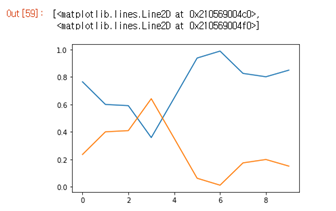
학습된 모델의 정확도 및 손실율 그래프를 나타낸다.
test_result = model.predict(test_images)
plt.plot(test_result)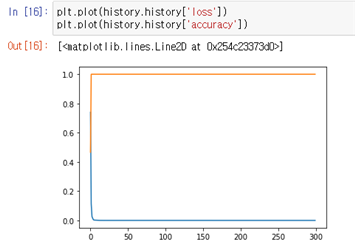
예측 이미지 데이터셋은 사람 5장, 컴퓨터 5장으로 구성된다.
url = 테스트 데이터 url

test_images = []

for i in range(10):
    file = url + 'img{0:02d}.jpg'.format(i+1)
    img = imread(file,plugin='matplotlib')
    img = resize(img, (224,224))
    test_images.append(img)

test_images = np.array(test_images)
plot_images(2, 5, test_images)
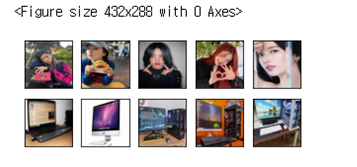
최종 예측 이미지 데이터로 테스트한 결과
fig = plt.figure()
fig, ax = plt.subplots(2,5, figsize = (10,4))
for i in range(2):
    for j in range(5):
        ax[i, j].get_xaxis().set_visible(False)
        ax[i, j].get_yaxis().set_visible(False)
        if test_result[i*5+j][0] > 0.8:
            ax[i, j].imshow(test_images[i*5+j],interpolation='nearest')
'프로젝트 > AI' 카테고리의 다른 글
| [AI] Yolo v4를 이용한 강아지 인식 인공지능 (0) | 2023.01.02 |
|---|---|
| [AI] Yolo v3를 이용한 이상행동 감지 인공지능 (0) | 2023.01.02 |

